Microsoft has recently rolled out an update for the Xbox app on Windows 11, marking a significant step towards optimizing the Windows experience for gaming handhelds. This update introduces a 'compact mode', designed to enhance the gaming experience on devices like the Asus ROG Ally and Lenovo Legion Go.
The Compact Mode Advantage
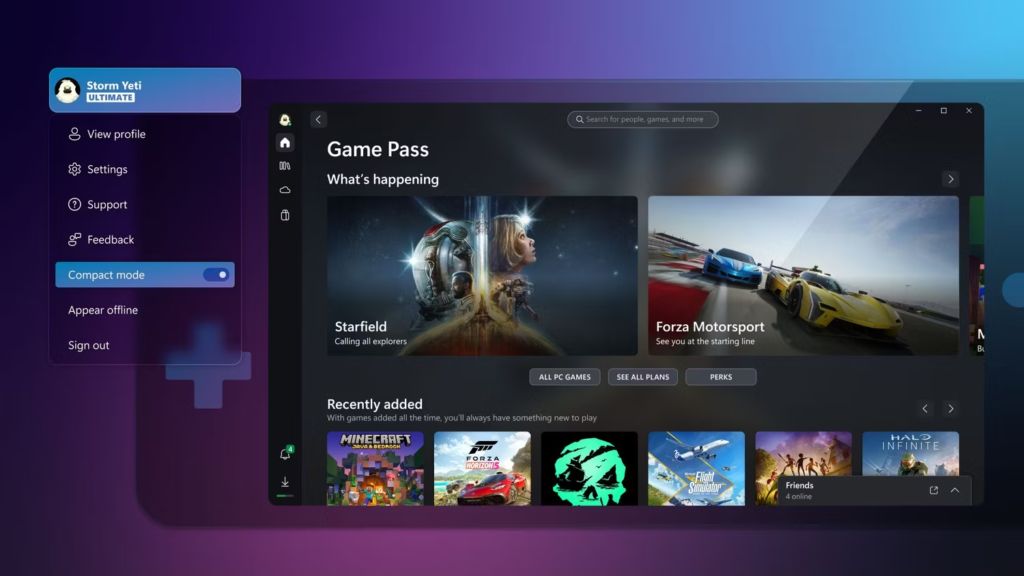
The key feature of this update is the compact mode. It is a touch-friendly interface tailored for smaller screens, typically found on handheld devices. This mode provides a more intuitive and accessible gaming experience for users without a mouse or keyboard. In compact mode, the app's sidebar collapses into icons, allowing more screen space for content navigation and faster access to games.
Easy Activation
Activating compact mode is straightforward. Users can enable it by clicking on their profile icon in the top-left corner of the app and toggling the "Compact mode" to the on position.
Windows 11: Embracing Handheld Gaming
Source: Microsoft
This update is available to all Windows 11 users, not just those using handhelds. Microsoft's initiative indicates a strong commitment to enhancing the Windows operating system for gaming on handheld devices. The company is working closely with PC handheld manufacturers to ensure that the compact mode is a default setting on these devices.
Addressing a Key Challenge
Prior to this update, the Windows platform faced criticism for not being optimized for smaller screens, which impacted the gaming experience on handhelds. This development is a response to those concerns, aiming to make Windows more adaptable and user-friendly for gaming on the go.
Additional Improvements
Alongside the compact mode, the Xbox app has also received improvements in notifications and banners. The update includes an option to display only unread notifications, simplifying the user's interaction with the app. Additionally, a new Gaming Services Repair Tool is introduced, aimed at resolving issues related to missing games or content. This tool is accessible under the "Support" section of the app.
Final Thoughts
Microsoft's update to the Xbox app on Windows 11 is a commendable step towards improving the gaming experience on handheld devices. It shows the company's dedication to evolving with the needs of its users and adapting to the changing landscape of gaming technology.